
Download Deepform – Secure Customer Feedback Portal, Free Trial, Real‑Time Analytics
Overview
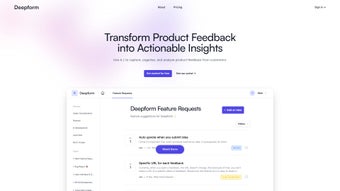
Deepform is a purpose‑built customer feedback portal that helps software teams turn raw user comments into actionable product road‑maps. By providing a single, centralized hub where customers can submit ideas, vote on existing suggestions, and engage in threaded discussions, Deepform removes the chaos that typically surrounds feedback collection. The platform is designed with a clean, responsive UI that works equally well on desktop browsers and mobile devices, ensuring that every voice can be heard no matter the channel.
What sets Deepform apart is its ability to transform qualitative input into quantitative insight. Every vote, comment, and discussion thread is automatically indexed, allowing product managers to spot trends, identify the most requested features, and prioritize development work based on real customer demand. Integrated analytics dashboards surface heat maps, sentiment scores, and activity timelines, giving teams a holistic view of user sentiment across the product lifecycle.
Sharing the portal with end‑users is seamless. Deepform generates embeddable widgets, custom email invitations, and social‑media ready links that can be placed on a website, within a SaaS app, or sent directly to a mailing list. Permissions are granular, letting admins decide which users can submit ideas, vote, or comment, while still keeping the experience frictionless for the end‑customer.
Whether you’re a startup looking to validate early concepts or an enterprise aiming to keep its product suite aligned with market needs, Deepform offers a secure, scalable, and intuitive way to make customer‑centric development a reality. Its cloud‑native architecture ensures that updates are rolled out automatically, so you always have the latest security patches and feature enhancements without manual intervention.
Core Features That Drive Product Success
Idea Capture and Voting Engine
Deepform’s idea capture module lets users submit free‑form suggestions or choose from predefined templates. Each submission automatically receives a unique identifier, making it easy to reference in internal meetings. The built‑in voting system allows community members to up‑vote ideas they love, creating a transparent popularity score that updates in real time. This democratic approach ensures that the most compelling requests rise to the top without requiring manual sorting. Administrators can also set vote thresholds that trigger automatic notifications, helping product owners act quickly on high‑impact ideas.
Discussion Threads and Collaboration
Every idea in Deepform can spawn a threaded discussion, enabling product teams to ask clarifying questions, share mock‑ups, or provide status updates. Users can reply, mention teammates, and attach files, turning a simple suggestion into a collaborative design sprint. Notifications keep participants informed of new comments, preventing important feedback from slipping through the cracks. The platform also supports markdown formatting, emoji reactions, and rich‑text editing, which encourages more expressive and detailed conversations among stakeholders.
Analytics Dashboard & Reporting
The analytics suite aggregates votes, comments, and engagement metrics into visual charts and downloadable CSV reports. Heat maps highlight which product areas receive the most attention, while sentiment analysis uses natural language processing to gauge overall user mood. These insights feed directly into agile planning tools, allowing teams to align sprint goals with verified customer priorities. Custom report templates let you schedule automated email deliveries, so executives receive a weekly snapshot of feedback trends without logging into the portal.
Integration & Embedding Options
Deepform offers RESTful APIs, webhooks, and native integrations with popular project‑management platforms like Jira, Trello, Asana, and GitHub. The portal can be embedded as an iframe on any website or within a SaaS product using a simple JavaScript snippet. Email invitations and social‑media sharing links are auto‑generated, making it effortless to invite customers to participate from any channel. For teams that rely on CI/CD pipelines, webhook events such as “new‑idea‑submitted” or “vote‑threshold‑reached” can trigger automated ticket creation, ensuring that feedback never gets lost in a backlog.
- Customizable branding and white‑labeling for a seamless brand experience
- Role‑based access control for admins, moderators, and users
- Real‑time vote counters and dynamic ranking algorithms
- Advanced filtering by tags, status, popularity, and submission date
- Exportable data in CSV, JSON, and Excel formats for offline analysis
- Multi‑language support for global teams and international customers
- Secure SSL encryption, GDPR‑compliant data handling, and ISO‑27001 hosting
- Automated email digests and activity notifications to keep users engaged
Installation, Usage & Compatibility
Getting started with Deepform is designed to be as frictionless as possible. The platform is delivered as a cloud‑hosted SaaS solution, so there is no need for on‑premise installation or server maintenance. After purchasing a subscription, you receive an email with a secure login link. Follow these steps to launch your portal and begin collecting feedback immediately:
- Account Creation: Click the invitation link, set a strong password, and complete the two‑factor authentication setup to protect your admin account.
- Workspace Configuration: Choose a workspace name, upload your logo, and select a primary color scheme to match your brand. You can also enable white‑label mode to hide all Deepform branding.
- Permission Settings: Define user roles (Admin, Moderator, Contributor) and set visibility options for public or private idea submissions. Granular permissions let you control who can vote, comment, or create new ideas.
- Embedding the Portal: Copy the provided JavaScript snippet or iframe code and paste it into the HTML of your website, product dashboard, or help center. The responsive design automatically adapts to any screen size.
- Invite Your Users: Use the built‑in email campaign tool or export a CSV of existing customers to send personalized invitations. You can also generate shareable links for social media or community forums.
Once the portal is live, customers can start submitting ideas immediately. As an admin, you’ll have access to a clean dashboard where you can categorize ideas, assign them to development tickets, and track voting trends. The platform’s responsive design ensures that the experience is smooth on any device, whether users are on a desktop browser, a tablet, or a mobile phone.
Supported Environments: Deepform runs entirely in the cloud and is compatible with all modern browsers, including Chrome, Firefox, Safari, and Edge. Because the portal is accessed via a web URL, it works on Windows, macOS, Linux, Android, and iOS without any additional software. The service also supports Single Sign‑On (SSO) via SAML, OAuth, and Azure AD for enterprise environments.
For teams that require deeper integration, the REST API can be called from any server‑side language (Node.js, Python, PHP, Java, etc.). Webhooks can push events—such as new idea submissions or vote thresholds—to your existing CI/CD pipelines, keeping your product backlog automatically up‑to‑date. Additionally, a dedicated sandbox environment is available for testing integrations before they go live in production.
Pros, Cons & Frequently Asked Questions
Pros
- Centralized feedback hub that eliminates scattered spreadsheets and emails.
- Real‑time voting creates a transparent prioritization system.
- Robust analytics turn qualitative comments into measurable insights.
- Easy embedding and multi‑channel sharing increase user participation.
- Secure, GDPR‑compliant hosting with SSL encryption and ISO‑27001 certification.
- Seamless integration with popular project‑management and development tools.
- Customizable branding and white‑label options for a professional look.
- Automated email digests and webhook notifications keep teams in sync.
Cons
- As a SaaS product, it requires an internet connection; offline use isn’t supported.
- Advanced customization beyond branding may need developer assistance.
- Pricing tiers can become costly for very large enterprises with thousands of users.
- Initial setup of complex permission structures can be time‑consuming for new admins.
- Feature‑rich analytics may have a learning curve for teams new to data‑driven product management.
FAQ – Your Deepform Questions Answered
Can I embed Deepform directly into my existing SaaS product?
Yes. Deepform provides an embeddable iframe and a JavaScript SDK that can be dropped into any web page or application. You can also customize the look and feel to match your product’s branding, and use SSO to keep the user experience seamless.
How does Deepform ensure data privacy and compliance?
All data is stored on ISO‑27001 certified servers with end‑to‑end SSL encryption. Deepform is GDPR‑ready, offering data‑export and right‑to‑be‑forgotten functionalities for EU users, and complies with CCPA for California residents.
Is there a free trial or a free tier?
Deepform offers a 14‑day free trial with full feature access. There is also a limited free tier for startups that allows up to 100 active users and basic voting functionality, making it easy to test the platform without commitment.
Can I export feedback data for offline analysis?
Absolutely. All ideas, votes, comments, and analytics can be exported as CSV, JSON, or Excel files, making it easy to import into BI tools like Power BI, Tableau, or Looker for deeper analysis.
How does Deepform integrate with my development workflow?
Deepform supports native integrations with Jira, Trello, Asana, GitHub, and Azure DevOps. You can automatically create tickets from high‑voted ideas, and webhook notifications keep your backlog synchronized in real time, ensuring that valuable feedback never gets lost.
What kind of support does Deepform provide?
Deepform offers 24/7 email support, a comprehensive knowledge base, live chat during business hours, and optional dedicated account managers for enterprise customers. All support channels are covered under the service level agreement included in each subscription tier.
Conclusion – Start Building Products Your Customers Love
In today’s fast‑moving software market, the gap between what developers think users need and what users actually want can be the difference between a product’s success or failure. Deepform bridges that gap by giving you a secure, easy‑to‑use feedback portal that not only collects ideas but also turns them into data‑driven product decisions. With its intuitive voting system, rich discussion threads, and powerful analytics, teams can prioritize features that truly matter, reduce wasted development effort, and accelerate time‑to‑market.
Whether you’re a lean startup looking to validate a minimum viable product or an established enterprise aiming to keep its roadmap aligned with a global user base, Deepform provides the tools you need to listen, learn, and act. The seamless embedding options, robust API, and out‑of‑the‑box integrations mean you can get started in minutes and scale as your community grows. Plus, the platform’s continuous updates and security patches ensure you always operate on a safe, modern stack.
Ready to put your customers at the heart of your product strategy? Download Deepform today, start your free trial, and experience a new level of insight that turns feedback into feature releases. Empower your team, delight your users, and build software that truly solves problems.



.png)



